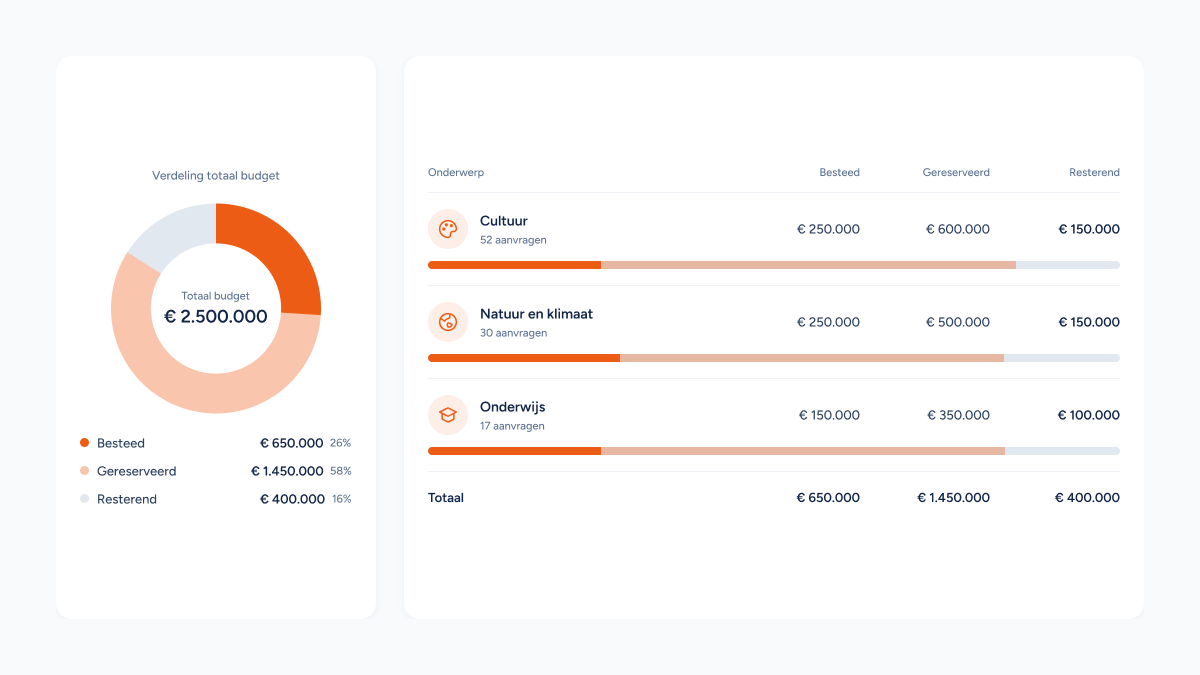
When you work with multiple budgets, keeping an overview is essential. You want to know at a glance how much budget is still available, which amount has already been reserved and what has actually been spent. With the Budgets feature you manage all your budgets in one place and keep continuous insight into the available resources.
Always insight into your budgets
Within FindNFund you easily create budgets for, for example, different themes and/or focus areas. Per budget you immediately see:
- The total available budget;
- Which amount is still available;
- Which budget has already been reserved;
- Which amount has been spent by now.
Because this information is updated in real time, you always work with up-to-date figures and avoid surprises.

Directly linked to applications
A major advantage of the Budgets feature is the link with applications. For every application you can indicate which budget it falls under. Reservations and expenses are therefore automatically visible within the right budget.
That way you not only keep an overview of your applications, but also of the financial room that is still available.

Getting started with Budgets
Are you already using FindNFund's Smart Grantmanagement? Then the Budgets feature can easily be activated for your environment.
Curious how you create and manage budgets and link them to applications? Have a look at our knowledge base article for a practical step-by-step explanation.
Would you like to have the Budgets feature activated, or do you have questions about the possibilities? Get in touch with us. We are happy to help you on your way, so that you immediately get more grip on your funding flows.