


How does the heart help you?
Meet our beloved heart, this small symbol can make your life a little easier when searching for interesting Finders, Funders or Projects. Where do you encounter the heart?
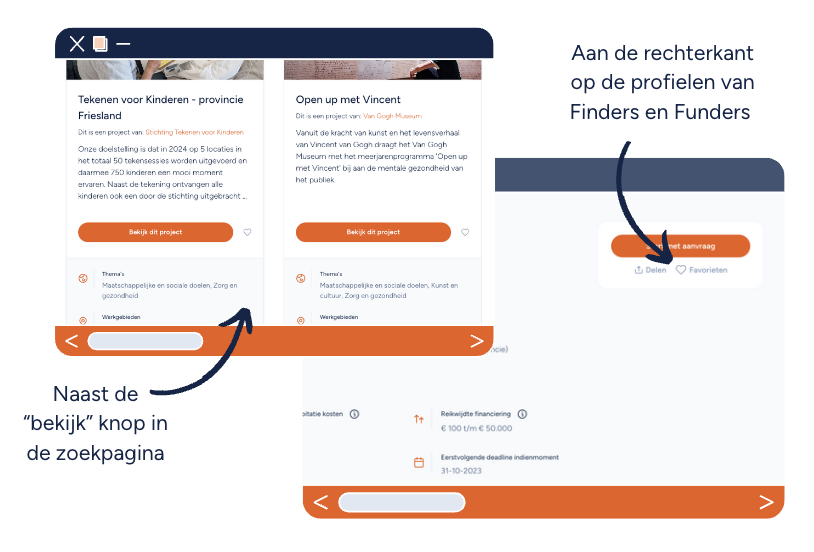
The heart can be used in various ways:
- Encountering a Finder/Funder/Project during your search that might be interesting but you want to explore later → add to favorites
- Encountering an interesting Finder/Funder/Project for a different task than what you are currently searching for → add to favorites
- An interesting Finder/Funder/Project appears on your 'for you' page → add to favorites
- You have a list for Finders/Funders/Projects and you encounter a new organization that is interesting for this → add to your special favorites list
Huh? Favorites list?
The heart is great, but there's more to get out of favorites. We have added a functionality to the platform called favorites list. The name actually reveals how it works; you can create lists with your favorites.
The favorites list is designed to offer you as a user a number of smart advantages:
- You can conveniently organize your favorites, so you can quickly find them again
- You can share the lists with colleagues, so you can collect interesting organizations together
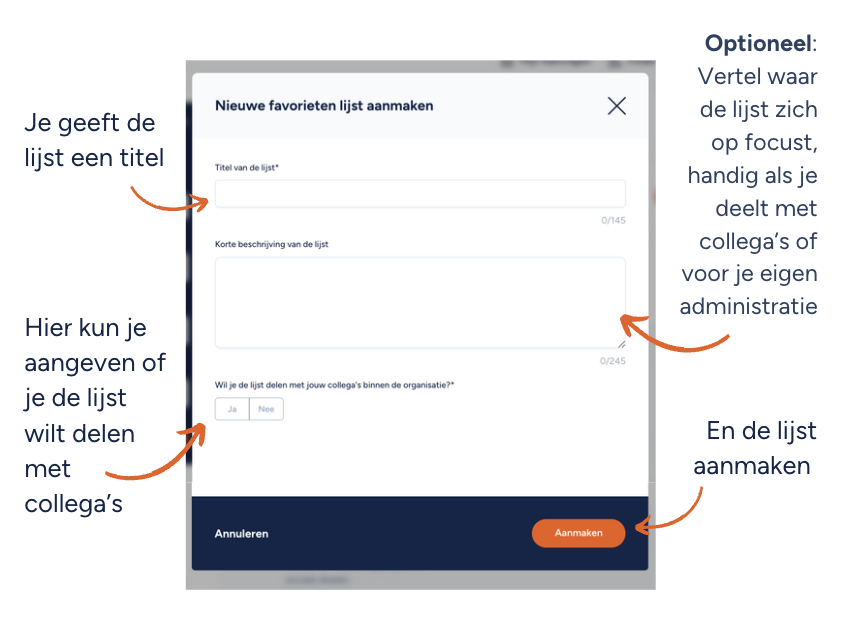
Creating a new favorites list
But how do you actually create such a list? It's simple! Click on the heart of the organization or project you want to add and then click on "create new favorites list". Fill in the title of the list and optionally add a description. This is useful when, for example, you collaborate with colleagues, so they know which list was created for which purpose. Then you indicate whether you want to share the list with colleagues within the organization. All colleagues who have access to your organization can then view the list.
And voilà, you have just created a new favorites list! The next step: search for interesting parties and add them to your favorites list. This way you make optimal use of our handy features and you can contribute to a world full of positive change!